Prepare a WhatsApp Campaign in Three Stages
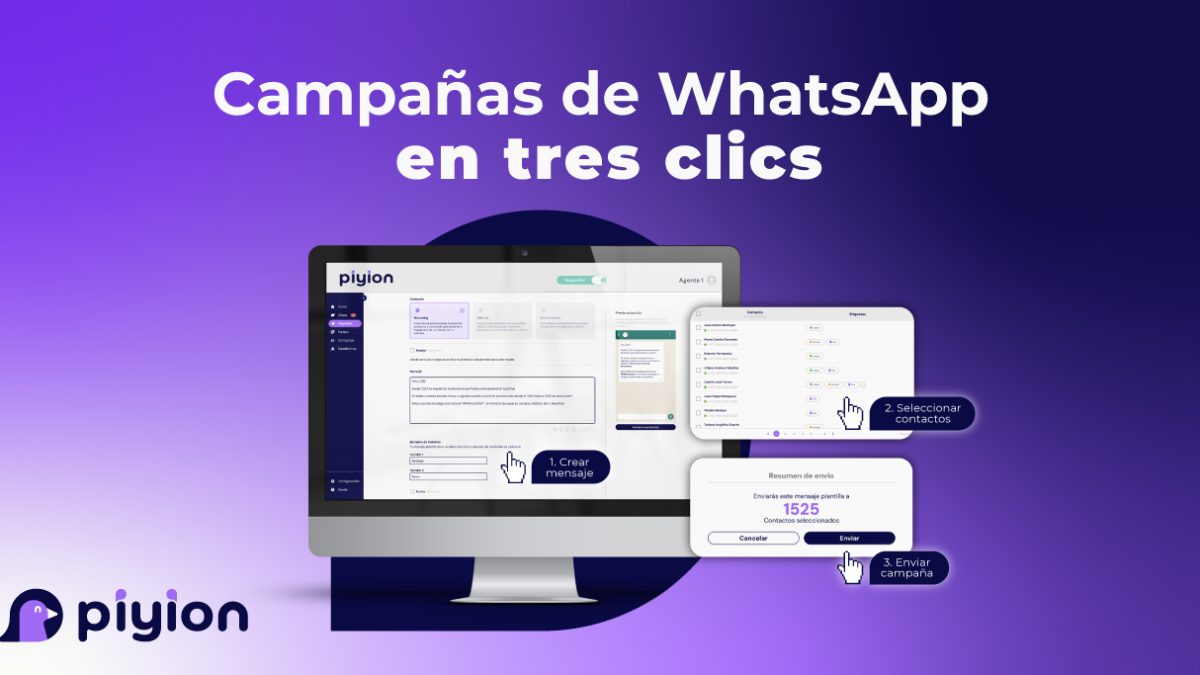
A WhatsApp campaign has three main stages: prepare the message, select the appropriate contacts and review the send. The number of clicks depends on the campaign and account setup; preparation and testing should not be skipped.
1. Prepare the message
Use the template format available for your campaign and review its approval status where required.
Header
A supported header may contain text or media such as an image, video or document. Choose material that helps explain the message rather than adding a visual element without a purpose.
Body
State the main information clearly. Explain the relevant offer or update, check any personalization fields and avoid unnecessary wording.
Footer
Use the available footer field for concise supporting information when appropriate. Check the template’s formatting limits before relying on a specific layout.
Buttons
Choose the action or quick-reply options supported by the template. Make the label clear and test the destination or response. Do not assume every type of link or call action is available in every configuration.
2. Select the contacts
Use relevant tags, interests or previous interactions to define the audience. Review who is included and confirm that the contacts should receive this type of message.
Read our guide to organizing customers with tags for a consistent segmentation process.
3. Review and activate the campaign
Preview the message, verify the recipient group and check the date, time and recurrence settings. Assign the people who will handle replies and define how interested customers will be followed up.
After the send, review the available delivery information, responses and customer outcomes. The Piyion WhatsApp CRM helps the team organize opportunities generated by those conversations.
See our bulk WhatsApp campaign planning guide or request a Piyion demo.
 English
 Español