
CAMPAIGNS THAT START CONVERSATIONS
Bulk WhatsApp messaging with the official API
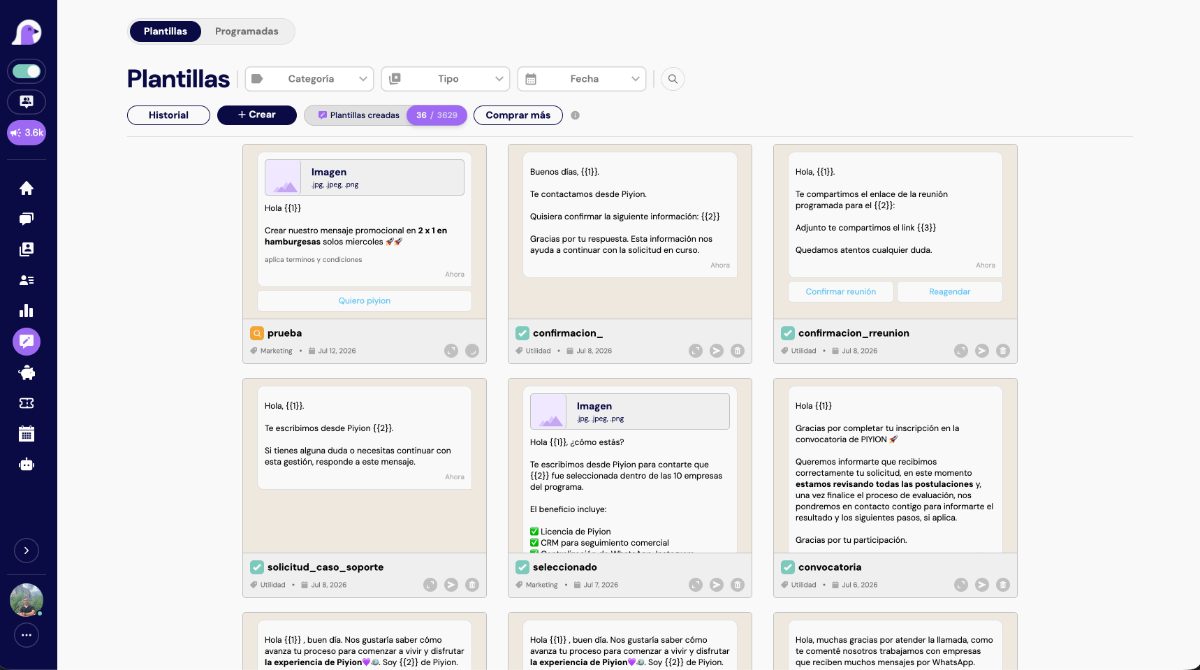
Piyion lets you segment contacts, schedule WhatsApp campaigns, and handle their replies from one platform.
Piyi AI from USD 299/month. Meta messaging fees are separate.
Explore Piyion and find the right plan for your team.
THE FIRST STEP IS A CONVERSATION
Turn more conversations into sales
Talk with our team and discover how Piyion helps you organize chats, follow up, and make the most of sales opportunities.
We will use your details to respond to your request. Read our privacy policy.







PIYION FOR YOUR BUSINESS
More reach. More control. Less guesswork.
If every campaign ends with a restricted number, undelivered messages, or an overwhelmed team, it is time to review your operation. Piyion connects your campaigns to the official WhatsApp API and the people who will handle replies. You can prepare a message, choose a relevant audience, and follow up on the interest it creates. The official API does not guarantee zero restrictions: message quality and policy compliance remain essential.
01 / FROM CHALLENGE TO SOLUTION
Fear of account restrictions holds campaigns back
Sending promotions through unofficial tools or contacting people who do not expect your message can put your operation at risk. Changing numbers whenever a problem occurs does not solve the cause. You need a way to communicate that customers recognize and want to receive.
Use templates and an official setup
With Piyion, you can use templates for campaigns through the WhatsApp Business Platform. Set a clear goal, identify your business, and explain what customers can do next. Before sending, check recipient consent and how you will handle opt-outs. An approved template lets you initiate the relevant send, but it does not replace consent or protect an account from every risk.
02 / FROM CHALLENGE TO SOLUTION
Sending the same message to everyone wastes opportunities
A promotion useful to someone who bought yesterday may be irrelevant to someone still asking for a quote. When your entire list receives the same text, the message loses context and your team has to answer questions it could have anticipated.
Segment and schedule with purpose
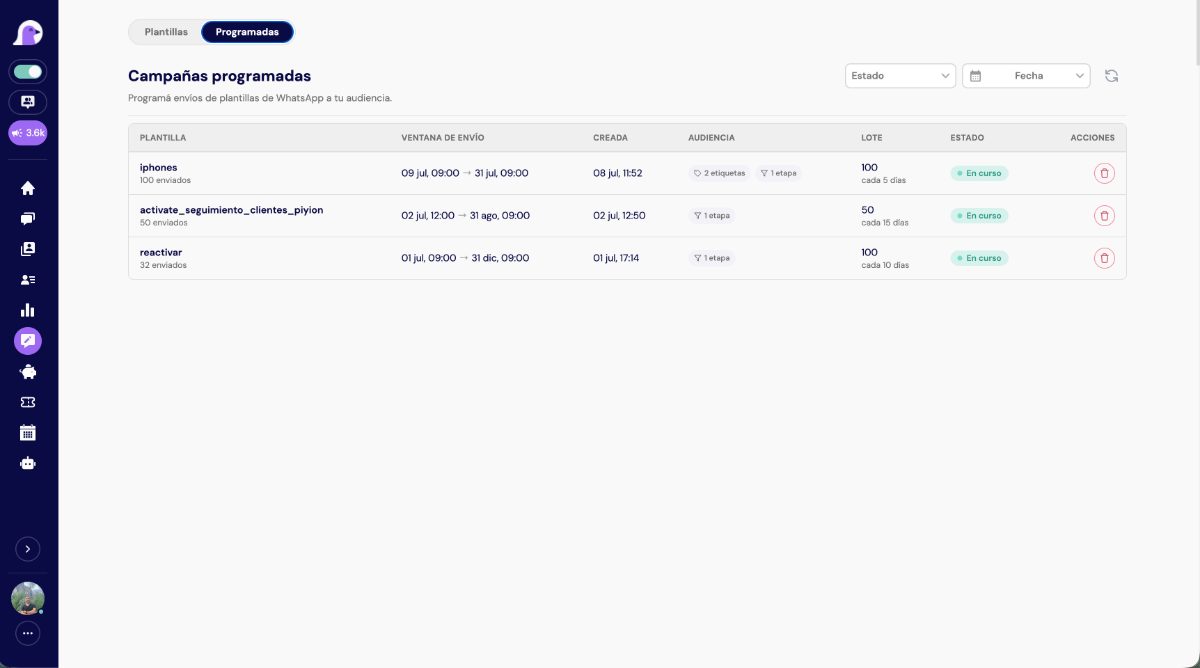
Choose recipients by contact, tag, or CRM stage. Schedule the date and time, set up recurring campaigns when appropriate, and decide which agents will handle the conversations. You can separate a product update from a pending follow-up and prepare different messages. Before repeating a campaign, confirm that recipients are still eligible and the frequency matches their expectations.
03 / FROM CHALLENGE TO SOLUTION
The campaign goes out, but nobody knows what happened
The work does not end when you press send. Without visibility, it is hard to distinguish a delivery problem from a message that sparked no interest. If replies have no owner, a well-prepared campaign can still lose opportunities.
Review metrics and handle every reply
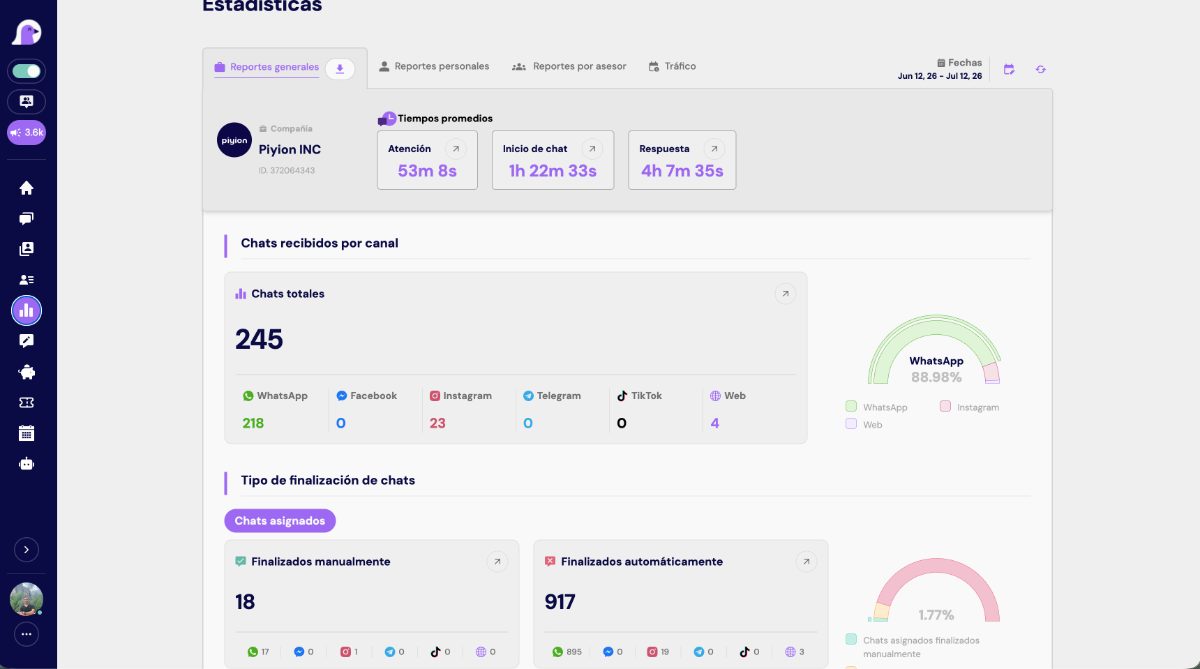
Review Piyion’s campaign history and available statistics: queued, sent, delivered, and read messages, plus errors. Coordinate support with the selected agents and use conversations to understand each contact’s intent. Compare results with the goal you set before sending; a read message is not a sale. To measure revenue, connect opportunities to sales recorded by your team.
YOUR CONNECTED ECOSYSTEM
Your tools can talk to each other.
Connect your processes with Piyion and keep your business information moving.





You can also connect your processes through APIs and webhooks.
CUSTOMER STORIES IN COLOMBIA
Businesses already working with Piyion.
iCali
Organized support, sales follow-up, and broadcast campaigns to support WhatsApp sales.
Panadería Montecarlo
Stronger digital support and WhatsApp sales channel.
Platería Ramírez
Digital channel support and chatbot assistance to keep requests moving.
Emssanar EPS
Automated transactional processes and customer support with a specialized team.
FROM DEMO TO DAILY OPERATIONS
Start with a clear process.
Define your audience
Check where each contact came from, what messages they agreed to receive, and which offer is relevant to them. Separate active customers, interested contacts, and people who have opted out.
Prepare the message and your team
Choose the right template, check its variables, and assign owners. The call to action should be easy to answer and match your team’s capacity to respond.
Launch, measure, and adjust
Schedule the campaign and review delivery, errors, and replies. If rejection signals appear, pause recurring sends and fix the audience or content before continuing.
CHOOSE FOR YOUR BUSINESS
WhatsApp Business app vs. Piyion
Compare your current support process with a platform that connects conversations, campaigns, and follow-up.
| Need | WhatsApp Business | Piyion + official API |
|---|---|---|
| Team support | App and linked devices, depending on setup. | Conversation assignment and multi-agent operation according to your plan. |
| Sales follow-up | Organization with app features such as labels. | Pipeline, tags, notes, and opportunity follow-up. |
| Campaigns | App broadcast tools, subject to availability and conditions. | Campaigns with templates, segmentation, and scheduling through the official API. |
| Automation | Reply features built into the app. | Automation and Piyi AI according to the relevant plan and scope. |
| Other channels | Operations centered on WhatsApp. | Additional integrated channels according to the selected plan. |
| Risk of restrictions | Subject to WhatsApp policies. | Also subject to Meta policies; it does not guarantee zero blocks. |
GROW AT YOUR OWN PACE
A plan for your next stage.
Starter
From · USD / month
$99
Organize your support
Growth
From · USD / month
$149
Connect more channels
Business
From · USD / month
$199
Support your team
Pro + Piyi AI
From · USD / month
$299
Add artificial intelligence
These are Piyion’s published starting prices. Your choice depends on users, channels, broadcast volume, and AI needs. Ask for a proposal that explains what your operation includes and how additional capabilities are priced.
Meta messaging fees are charged separately. Confirm billing terms and any implementation services your project needs. Bring an estimate of contacts, campaigns, and agents to the demo to assess a realistic scenario.
ANSWERS TO HELP YOU DECIDE
Frequently asked questions
Can I send bulk WhatsApp messages without account restrictions?
No provider can guarantee zero restrictions. Piyion helps you organize campaigns through the official API, but Meta may restrict accounts for policy violations or poor quality signals. Contact consent, message relevance, and honoring opt-outs remain necessary.
Do I need permission to send a campaign?
Yes. Your audience must have agreed to receive the relevant messages from your business. Having a number in a spreadsheet does not, by itself, prove permission. Keep a record of its source and exclude people who ask to stop receiving messages.
Can I schedule recurring campaigns?
Yes. Piyion lets you schedule one-time and recurring campaigns. Review the audience, template, dates, and owners before activating them. Recurring campaigns need supervision to avoid repeated or outdated messages.
Who handles campaign replies?
You can select one agent, several agents, or the support team depending on your setup. Replies continue in Piyion, where agents can retain context and help contacts move toward a quote, purchase, or resolution.
How much does bulk messaging with Piyion cost?
Published plans start at USD 99 per month. Broadcast capacity depends on the plan, and additional sends are quoted separately. Meta messaging fees are charged separately. Request a proposal based on estimated volume and destination countries.
Which metrics can I review?
The campaign module shows queued, sent, delivered, and read messages and errors when that information is available. Use the figures to assess delivery and engagement. To analyze sales, your team must record and link opportunities to closed deals.
Can Piyion automatically restore a blocked number?
No automatic restoration is promised. If your account is restricted, first identify the reason and review Meta’s available options. Meta evaluates appeals; using a platform does not remove an existing restriction.
LEARN WITH PIYION
Ideas to grow your operation.

PIYION GUIDES
Why WhatsApp restricts business accounts and how to prevent it
Read article ↗
PIYION GUIDES
Scheduling bulk WhatsApp sends: the complete guide to Piyion
Read article ↗

PIYION GUIDES
WhatsApp Business API: what it is and why your business needs it
Read article ↗

PIYION GUIDES
Boost your marketing on WhatsApp
Read article ↗
YOUR NEXT STEP STARTS HERE
Your business has plenty
to talk about.
Tell us what you want to improve, how many people handle chats, and where the process stalls today. We will review your needs and show you how Piyion can help.
 English
  Spanish