
PIYI AI · WHATSAPP FOR BUSINESSES
WhatsApp chatbot with artificial intelligence
Piyi handles the first contact, answers using your business knowledge, and hands the context to a person when the conversation needs one.
The scope depends on your plan and setup. Meta messaging fees are charged separately where applicable.
SEE PIYION IN ACTION
See Piyi at work
Tell us which questions come up most often and how your team handles them today. We will show you what Piyi AI can do for your business. Every plan includes AI credits starting at USD 99/month. Confirm your account activation during the gradual rollout.
Decide with your real workflow
Evaluate AI with questions from your business
Start with repeatable tasks, a clear information source and a simple handoff to a person.
- Prepare ten common questions with the answers your business considers correct.
- Include three escalation situations: missing information, a commercial exception or a customer asking for an agent.
- Review accuracy, handling time and continuity of context before expanding the flow.
All published plans include AI credits. Consumption depends on messages, context and workflow; credits are not a fixed number of customers served.
AI WORKS WITH YOUR TEAM
Automate the first response without losing context.
A useful chatbot needs to know your business and understand when a person should step in. Piyi helps welcome customers, understand their needs, and answer with information configured for your operation.
When a question requires sales or support judgment, your team can continue the conversation in Piyion with the history available. The scope of automation is defined during implementation.
01 / RECEIVE
Respond when a question comes in
An after-hours message can become a missed opportunity if no one knows why the customer reached out.
First response with Piyi AI
Piyi welcomes the customer, answers common questions using the configured knowledge, and collects the information needed to guide the next step.
02 / HANDOFF
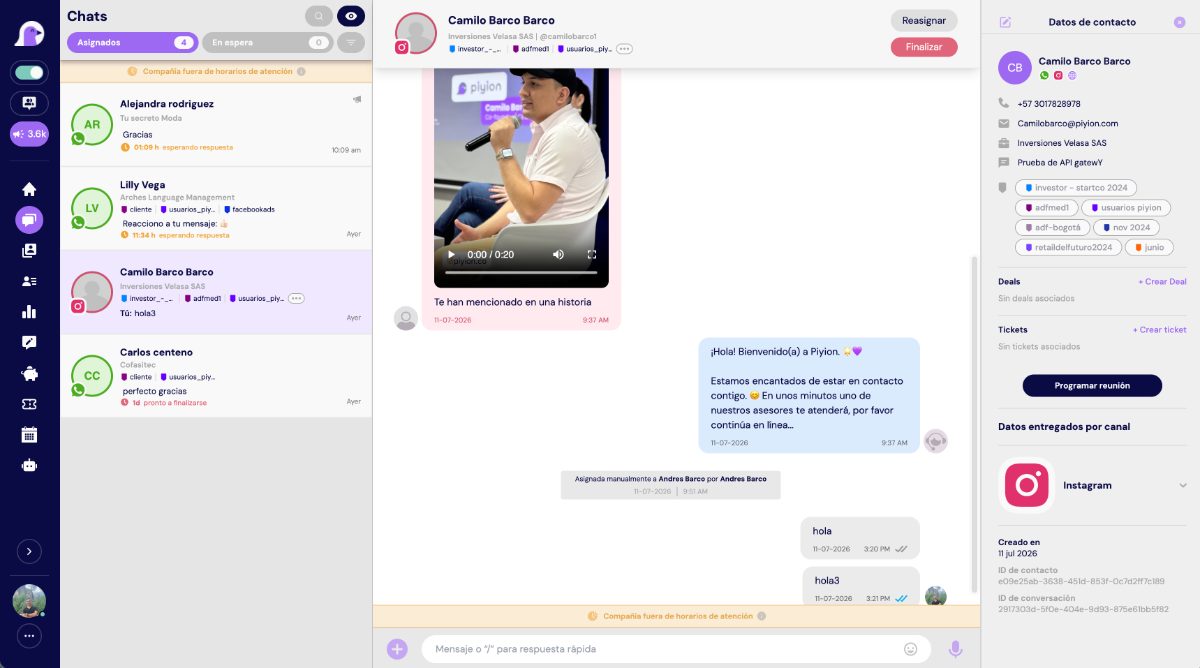
Hand over from AI to an agent with context
A handoff without history forces the customer to repeat the same information.
People and AI in one inbox
When a person is needed, your team continues in Piyion. They can review the conversation, assign an owner, and add notes for follow-up.
03 / ORGANIZE
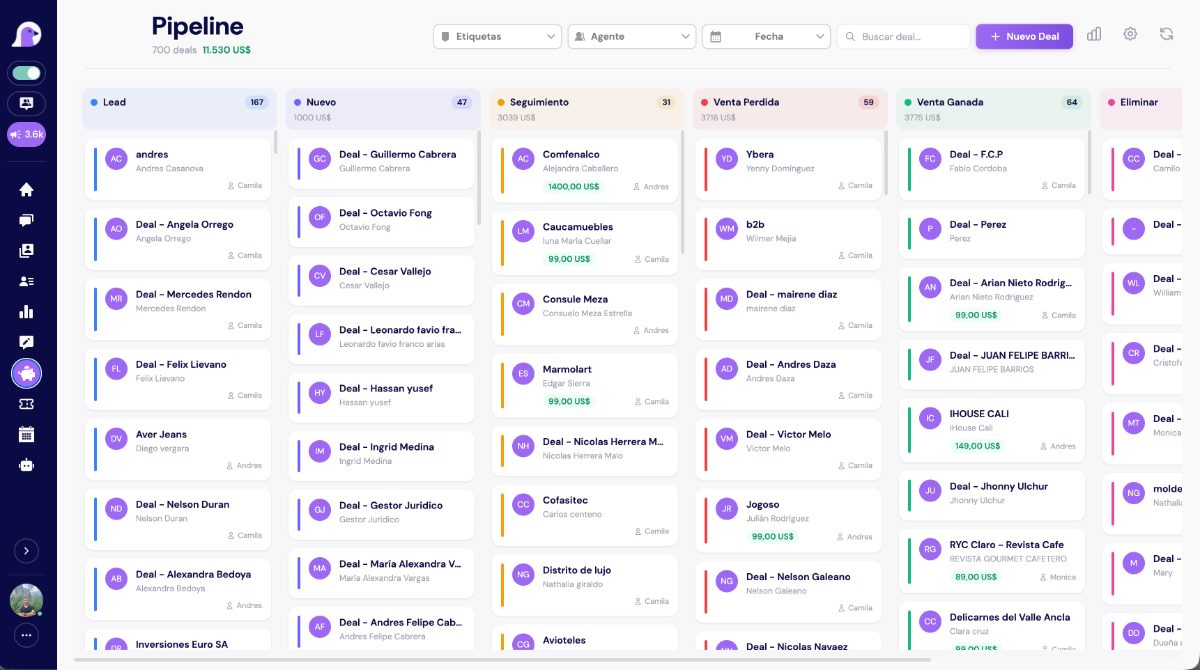
Bring every conversation into the CRM
A quick response means little if the opportunity has no owner or next action.
Follow-up after the response
Classify contacts, use tags, and organize opportunities in the Piyion pipeline. Automation supports the sales process while your team decides what to do next.
FROM DEMO TO DAILY OPERATIONS
How to set up Piyi for your business
Map the questions
We identify frequently asked questions, business hours, channels, and points where service currently slows down.
Prepare the knowledge base
We organize the business information Piyi will use to guide its answers.
Define the handoff
We agree on which questions a person will handle and what context they should receive.
Review the workflow
Your team reviews the answers and adjusts the scope as it learns from conversations.
PRACTICAL GUIDE
How to create a WhatsApp chatbot that helps your team
Start with one clear task, such as answering opening hours, collecting request details, or guiding a common question. A useful chatbot needs accurate information and a clear path to a person; automatic replies alone are not enough.
- Choose the questions: review real conversations and separate repeated questions from cases needing human judgment.
- Prepare the knowledge: gather current hours, services, policies, and answers your team can verify.
- Define the handoff: decide when Piyi should pass a chat to an agent and what context should follow it.
- Test before expanding: try common, ambiguous, and after-hours questions; improve answers and escalation paths.
- Measure and refine: review resolved questions, handoffs, and conversations that need CRM follow-up.
In Piyion, Piyi AI answers using knowledge configured for the business, while the team can continue the conversation in the same workflow. Scope, channels, and activation depend on the plan and implementation; confirm them during a demo.
When you are ready to implement it, follow the guide to creating a WhatsApp chatbot and prepare your team’s first questions.
COMPARE BEFORE YOU DECIDE
Standalone chatbot vs. Piyi AI inside Piyion
| Need | Separate workflow | With Piyion |
|---|---|---|
| Context | Answers disconnected from sales work. | Conversation and history available to the team. |
| Human support | Handoff outside the workflow or done manually. | Continuity in the same multi-agent workflow. |
| Follow-up | An answer does not always become a task. | Contacts, tags, and opportunities in the CRM. |
| Scope | Depends on a generic setup. | Knowledge and flows defined for your business. |
CUSTOMER STORIES IN COLOMBIA
Companies organizing conversations with Piyion.
The scope of each implementation depends on the company’s process, team, and channels.
iCali
Organized support, sales tracking, and WhatsApp broadcast campaigns.
Panadería Montecarlo
A stronger digital channel and continuity in sales conversations.
Platería Ramírez
Digital support and chatbot assistance to guide requests.
Emssanar EPS
Automation of transactional processes and user support.
ANSWERS TO HELP YOU DECIDE
Frequently asked questions
What is Piyi AI?
Piyi is Piyion’s AI assistant. It can receive inquiries, answer using knowledge configured for your business, and collect information before handing the conversation to your team.
Can it respond outside business hours?
Yes. Automated support can receive and guide inquiries outside your team’s hours, according to the agreed setup.
Does Piyi replace my agents?
Piyi helps with the first response and repetitive questions. Your agents continue handling cases that need judgment, negotiation, or personal support.
Can it work with the CRM?
Piyi is part of the Piyion workflow, where your team can organize contacts, notes, and opportunities. We review the specific journey during the demo.
Which channels does it work on?
Piyi AI is offered as an omnichannel capability in the applicable plan. Available channels depend on the plan and each implementation’s setup.
How much does Piyi AI cost?
Every plan includes AI credits per paid billing cycle: Starter, USD 99 and 10,000 credits (up to 2,000 reference responses); Growth, USD 149 and 30,000 credits (up to 6,000); Business, USD 199 and 60,000 credits (up to 12,000); Pro, USD 299 and 150,000 credits (up to 30,000). The actual number of responses depends on usage. Confirm your account activation. Top-ups start at USD 10; Meta charges are separate.
Do I need the official WhatsApp API?
To run WhatsApp through a business platform, the channel must be configured in line with the WhatsApp Business Platform and Meta’s policies.
How can I see a demo?
Complete the form on this page. We will review your inquiries and show you a walkthrough tailored to your operation.
KEEP EXPLORING
Find the next answer for your operation.

YOUR NEXT STAGE STARTS HERE
Piyi responds. Your team moves forward.
Bring the first response, customer context, and sales follow-up together in one workflow.
What a chatbot should handle before a human handoff
A useful flow identifies the request, uses validated business information and preserves context for a person. Start with a bounded task such as inquiry classification or initial quote details.
- Test a question covered by the knowledge provided.
- Test a question without an available answer.
- Test an explicit request for a person.
- Test a mid-conversation change of intent.
- Test a case that needs individual review.
See the chatbot setup guide and welcome and away examples. A basic automated reply is different from an AI agent; choose based on your process.
 English
 Español